11th Sep, 2007

Quickly Find/Open a File in Visual Studio

Here is a cool Visual Studio feature that almost nobody knows about. If you want to open up a file in your solution, but can’t be bothered to dig down through your projects and folders to find it, try this,

  1. Click in the Find box in the toolbar,
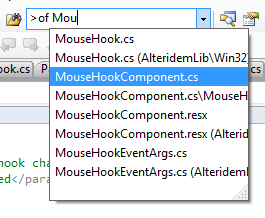
  2. Type >of followed by a space, then begin the name of the file you are looking for.
  3. An auto-complete drop down will appear as you type filtering all the files in all your projects in your solution. Continue typing until the list is short enough to fine the one you want. Select it and hit enter.
  4. The file will open in the editor.
openfile

Update: After this post made the front page of DotNetKicks, Aaron Lerch wrote a great post on his blog with more things that you can do with the find combo. One thing that is very useful is that with the >, you can issue any command, the alias >of mentioned here is just one of many. For a list of the commands, check out this MSDN page.

Another useful tip is that Ctrl+D or Ctrl+/ will automatically jump to the find box, so your hands don’t even need to leave your keyboard.

Update: This trick was also mentioned on Just Sayin More Words as a part of his Stupid Visual Studio Trick series. Thanks.

If you found this post helpful, please "Kick" it so others can find it too:

Responses

Type CTRL + ‘ to go to the find box, that way you don’t have to use your mouse

good trick, with the keyboard short cut to focus on te search box it will be better.
you know it?

There is also the ctrl-alt-a to open the command window, then type open filename.cs

You also get an auto-complete drop down list, with history (up and down keys), but no need to use the mouse.

Excelent! Now to find a shortcut that puts a focus inside that find box…

Thanks Rob!

And, for the record, so it doesn’t look like I’m just a copycat, I had my post written a week or so ago, but just didn’t get it finished until yesterday, and of course as soon as I posted it I saw yours on dotnetkicks and said “doh!” :)

Thanks! :)

Aaron, no copycatting implied ;)

We all learn from one another, that is what its all about.

another post on the same topic.
http://www.aaronlerch.com/blog/2007/09/11/the-talented-mr-editgotofindcombo/

this one with the keyboar shortcut:
ctrl + d or ctrl + /

Even better is ctrl-shift-n which brings up a very cool look ahead file or class finder. I probably use this shortcut close to 100 times a day. However, I just realised this is actually (I think – will have to double check) Resharper goodness. All the more reason to use Resharper.

[...] [Quickly Find/Open a File in Visual Studio] [...]

[...] Lately I’ve been using Visual Studio, and I’ve yet to find an equivalent. There’s this tip which doesn’t work for me, and the FileFinder plugin which seems to do the job, but it keeps [...]

It is healthy, I shall come on your site more often, thank.,

It’s a very good site !! Very nice work, admin :) Good luck !,

Keep a good work man!,

thanks very useful

i am not able to find this shortkey i am using vs 2005 professional edition.
is there any other way to search files ?

SonicFileFinder is a VS free addin that does this in a more powerful and more accessible way: http://jens-schaller.de/sonictools/sonicfilefinder/index.htm

It should help you guys =)
http://www.stjhimy.com/2009/10/20/playing-around-with-visual-studio-make-things-quickly/

You made me one happy coder. Thanks!

Awesome website thanks

if you want to download books for free
“mrnurullo.ucoz.com”

if you want to download books for free
http://www.mrnurullo.ucoz.com

Leave a response

Your response: