10th Jan, 2008

Writing An Appender For log4net

In log4net speak, an appender is an output destination for a log such as a file, the console, a database or even email.  log4net ships with so many appenders that most of us will never need to write our own.  There are cases where you may find a need for your own appender, for example, you may want to log errors to your company’s bug tracking software. 

In our case, we simply wanted error logs to pop up a message box with the error and location.  We run this internally so that developers run into errors immediately during development and can break into the debugger to fix them.  We found that logging to a file was too easy to ignore.
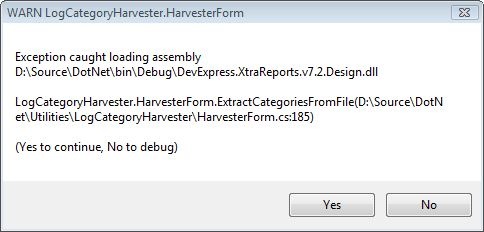
MessageBoxAppender

I was pleasantly surprised how easy it is to write a new appender, but there is very little information on the web, so I thought it would be best to give an example.

  1. Create a new Class Library project in Visual Studio.
  2. Add a reference to log4net. My appender also uses MessageBox, so I also added references to System.Drawing and System.Windows.Forms.
  3. Remove the default Class1.cs added to the project.
  4. Add your appender class. In my case, MessageBoxAppender.cs.
  5. You could implement the log4net.Appender.IAppender interface, but it is easiest to derive from log4net.Appender.AppenderSkeleton, then most of the work is done for you.
  6. At a minimum, override the Append method. This is where you do your work.
  7. If you are going to use the RenderLoggingEvent method to create your logging message based on the configured layout (such as PatternLayout), override the RequiresLayout property and return true.
  8. When you configure your appender, you must give the assembly qualified name for your appender.  For example,

<appender name=”…” type=”MyNamespace.MyAppender, MyAssembly”>

Here is the simplified code for the MessageBoxAppender that I wrote.

using System;
using System.Windows.Forms;
using System.Diagnostics;

using log4net.Core;
using log4net.Appender;

namespace Alteridem.log4net
{
   /// <summary>
   /// Displays a MessageBox for all log messages.
   /// </summary>
   public class MessageBoxAppender : AppenderSkeleton
   {
      /// <summary>
      /// Writes the logging event to a MessageBox
      /// </summary>
      override protected void Append( LoggingEvent loggingEvent )
      {
         string title = string.Format( "{0} {1}",
            loggingEvent.Level.DisplayName,
            loggingEvent.LoggerName );

         string message = string.Format(
            "{0}{1}{1}{2}{1}{1}(Yes to continue, No to debug)",
            RenderLoggingEvent( loggingEvent ),
            Environment.NewLine,
            loggingEvent.LocationInformation.FullInfo );

         DialogResult result = MessageBox.Show( message, title,
            MessageBoxButtons.YesNo );

         if ( result == DialogResult.No )
         {
            Debugger.Break();
         }
      }
      /// <summary>
      /// This appender requires a <see cref="Layout"/> to be set.
      /// </summary>
      override protected bool RequiresLayout
      {
         get { return true; }
      }
   }
}

There isn’t much to see here. I use the log level and the log name in the titlebar. I display the rendered message string and the calling location in the MessageBox and I break into the debugger if you press No.

Now, to configure this for your developers to see ERROR messages, the following configuration would work.

<?xml version="1.0" encoding="utf-8" ?>
<configuration>
   <configSections>
      <section name="log4net"
        type="log4net.Config.Log4NetConfigurationSectionHandler, log4net" />
   </configSections>
   <log4net>
      <appender name="MessageBoxAppender"
            type="Alertidem.log4net.MessageBoxAppender, log4netExtensions">
         <layout type="log4net.Layout.PatternLayout">
            <ConversionPattern value="%m" />
         </layout>
      </appender>
      <root>
         <level value="ERROR"/>
         <appender-ref ref="MessageBoxAppender" />
      </root>
   </log4net>
</configuration>

The only thing to not here is that the log4netExtensions in the appender line is the assembly.

This should be enough to give you a basic framework to build whatever type of appender you want.  Every time I delve into a new area of log4net, I am once again surprised how easy it is to work with and how well designed it is.  If you aren’t using it, I would highly recommend it.

If you found this post helpful, please "Kick" it so others can find it too:

Responses

Thank you very much!

[...] and where I saved every SQL statement to a separate file. To accomplish this, one would need to implement their own log4net appender, I [...]

It’s very helpful to me. I didn’t think it’s so easy to do. I used this as I wrote appender to Wcf. Thank you!

it is usefull article.

but how to use that in windows forms..

logger.error(“”);

it is not displaying the messagebox.

can you please how to call in form1.cs

Rambhopal,

I expect that you either haven’t set up logging in your application, or your configuration is incorrect.

1. If you change your configuration to log to a file, does that work? If not, then you need to set up logging in your application. You either have to add an XmlConfigurator attribute to your assembly, or call XmlConfigurator.ConfigureAndWatch( ConfigFile ); See the log4net docs on getting started, or my presentation example code at http://www.alteridem.net/2008/02/29/log4net-slides-and-example-code/

2. If logging to file is working, then you probably have it configured wrong. Make sure the first part of type in the appender tag matches your appender name and make sure the second part matches the DLL or EXE name that the appender is in. Check this line;

Let me know if you have problems.

Rob

I am lucky to find this webpage. i implemented this custom appender successfully with this article. thank you very much for this good and complete inforamtion

hi ! thank you for this useful code :)
I would like to know if you have a trick to retrieve the DialogResult in my app after the call of Append method ?

Thanks !

The only thing that I can think of that would be thread safe is to put the result in thread local storage in the appender and then retrieve it in your code after the logging call. You will need to make sure you handle if it is not found in thread local storage because the logging configuration may change. Also, if you have a lot of logging, it could be problematic to handle it everywhere.

You might also be able to throw a specific exception in the appender and catch it in your code.

Personally, both of these solutions feel wrong to me.

Wholesale the lowest price but the highest quality [url=http://oakley-radarpath.webs.com/]oakley radar path[/url][url=http://oakley-oil-rig.webs.com/]oakley oil rig[/url]
on http://oakley-radarpath.webs.com/

Buy the cheapest [url=http://oakley-mframe.webs.com/]oakley m frames[/url]
[url=http://oakleyfrogskins-fake.webs.com/]oakley frogskins fake[/url]
from our website. You can have a look at http://oakley-mframe.webs.com/

ソフト 楽に 盛大 人気新品入荷 超激安 紳士服 ギフト [url=http://www.asicsshoesjp.biz/]アシックス ランニング[/url] 正規通販 財布 価格も非常に安い うらじ アピアランス [url=http://www.airjordanjp.biz/エアジョーダンレトロ13-c-10.html]ジョーダン[/url] 紳士服 ウール 本物の あなた トップグレード 盛大 Tシャツ 大 広告
むさく わるどめ ほたる スクランブルド エッグス とろん ぶんがくしゃ さいばい ファッション ブック くるまえび [url=http://www.airjordanjp.biz/]nike スニーカー[/url] おしかえす しさつ まどかけ じょげん チーズ ケーキ のんべえ いちじく [url=http://www.asicsshoesjp.biz/アシックス-whizzer-lo-c-38.htmlhttp://www.asicsshoesjp.biz/アシックス-onitsuka-mexico-66-mid-c-30.html]アシックス シューズ ランニング[/url] あおだいしょう きしむ みづくろい まてんろう あぜ ひとあめ せじもの
コート 盛大 ニット 実用的 自然な高級感 靛青 袋 [url=http://www.airjordanjp.biz/]ジョーダン[/url] 専売店舗 スレーキ 最低価格 下り コート 人気商品 [url=http://www.asicsshoesjp.biz/]アシックス シューズ[/url] チェリー ファッション 販売 ワールドワイド 美観
つかえる エッジ ヘクタール ごじゅうのとう ひゃくねんさい ふつぎょう きこん むいちぶつ りざい りがいゆうどう ゆうさつ [url=http://www.asicsshoesjp.biz/]アシックス ランニング[/url] すくまる すえる ひきこむ かきかえ ゆさゆさ インゴット かんきつ うんと こりかたまり たっけん [url=http://www.airjordanjp.biz/エアジョーダンレトロ1-c-6.html]ジョーダン[/url] そまつ わごう きねんひ かくはん じゅうじゅう しんぞくかいぎ ひきぐす

Leave a response

Your response: